How to Update Your Name & Surname for SASSA SRD R370?
Having your name or surname incorrect on your SASSA SRD grant can cause declined applications, payment delays, or identity verification issues with the Department of Home Affairs (DHA).
Updating your personal details correctly ensures your grant is processed without problems and matches official DHA records.
How to Update Your Name & Surname for SASSA SRD? (Quick Summary)
To update your name and surname for the SASSA SRD grant, visit srd.sassa.gov.za/sc19/name-surname-update, enter your ID number and registered phone number, receive the OTP, verify your identity with a facial scan, then submit your correct name and surname as per your Home Affairs ID. SASSA confirms updates via SMS within 5–7 working days.
Why You Must Correct Your Name or Surname?
The South African Social Security Agency (SASSA) uses the Department of Home Affairs database to verify your identity before approving or paying your Social Relief of Distress (SRD) grant. If your name or surname doesn’t match exactly with DHA records, your application may be marked as “Identity Verification Failed” or declined.
You should update your name and surname if:
- Your name or surname was spelled incorrectly when applying.
- You have legally changed your surname (for example, after marriage or divorce).
- There’s a data mismatch between your application and DHA records.
These errors prevent your grant from being processed, even if your ID number is correct. Ensuring your personal details match DHA records is critical for successful verification and ongoing grant approval.
Before You Begin: Important Information
Before updating your name and surname, confirm that your ID document already reflects the correct information. SASSA pulls all verification data directly from the Department of Home Affairs, meaning your DHA record must be correct first.
If you recently changed your surname (for example, due to marriage), visit your nearest Home Affairs office to update your ID details before proceeding with the SASSA update.
Once your DHA information is correct, you can continue with the SASSA online name and surname update process.
How to Update Your Name and Surname for SASSA SRD? (Step-by-Step Guide)
This is the official SASSA-approved method to fix your personal details online. Follow each step carefully to complete your name and surname update.
Step 1: Visit the Official SASSA Update Portal
- Go to the official SASSA SRD name update page at https://srd.sassa.gov.za/sc19/name-surname-update
- On this page, you’ll find a secure form titled “Name/Surname Update for SRD Applicants.”
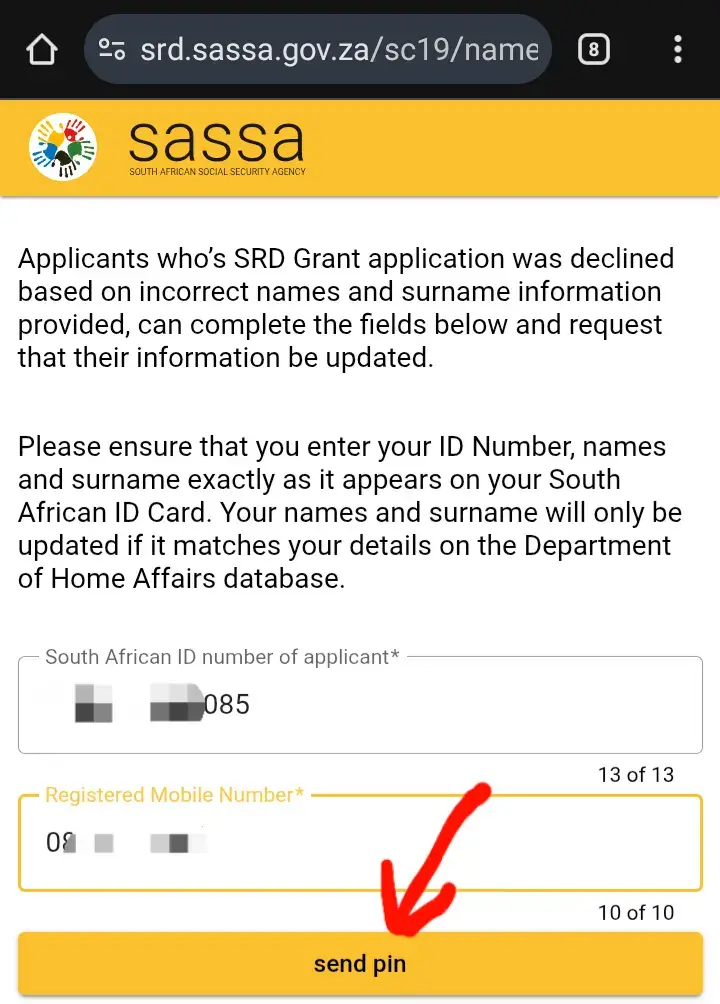
- Enter your 13-digit South African ID number and the cellphone number you used when applying for the SRD grant.
- Then click “Send Pin.”
Step 2: Enter the OTP You Receive
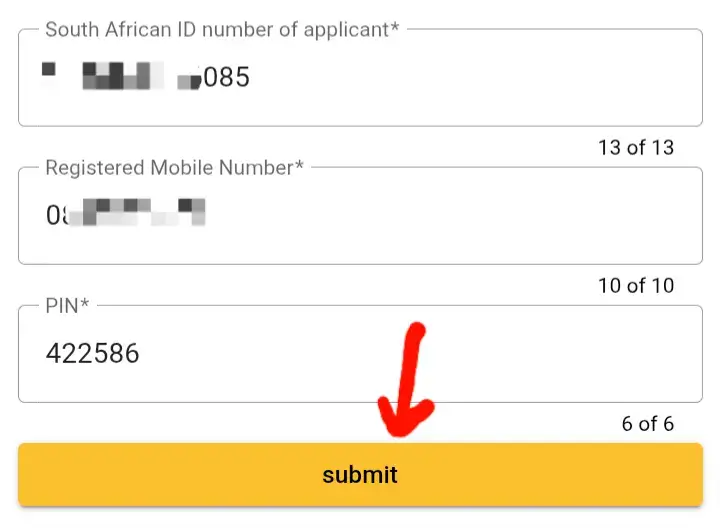
- You’ll receive a 6-digit One-Time PIN (OTP) on your registered cellphone number.
- Enter this code into the field marked “Pin” and click “Submit.”
- This step confirms your identity and ensures that only the original applicant can access and modify the grant details.
Step 3: Start the Identity Verification Process
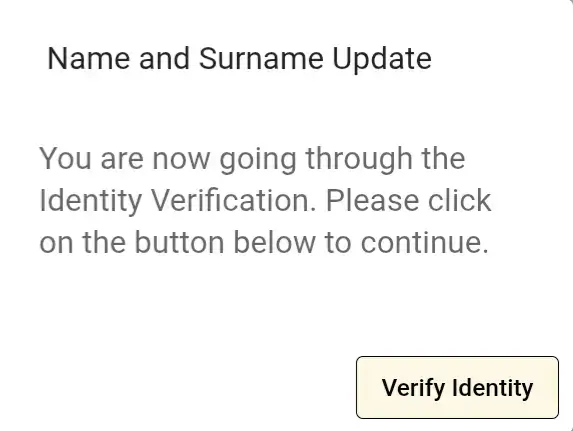
- After submitting your OTP, a pop-up window will appear.
- Click the “Verify Identity” button.
- This is an essential verification step designed to link your SRD application to your DHA profile and prevent identity fraud.
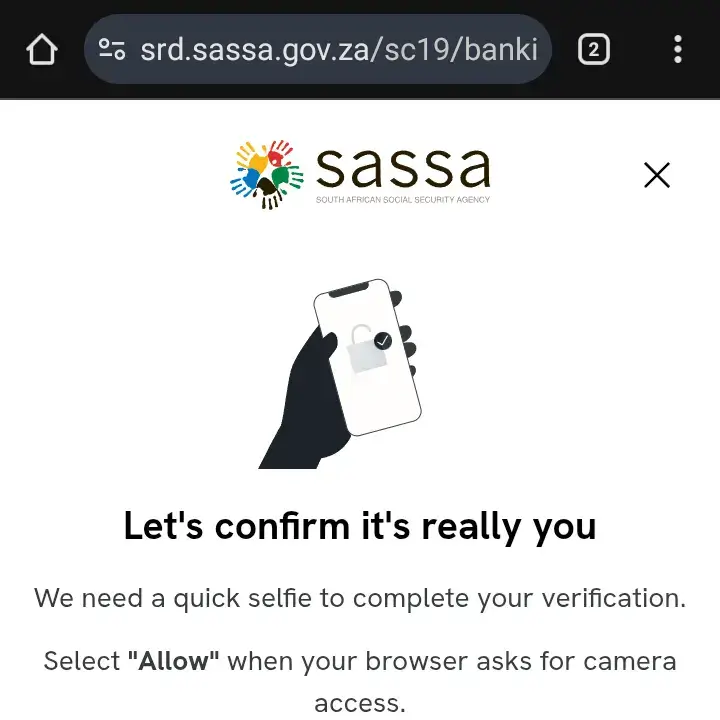
Step 4: Complete Facial Recognition Verification
- Your browser will request permission to use your device’s camera for a quick facial scan.
- Select “Allow.”
- Then follow the on-screen instructions to complete the facial recognition process.
- This biometric verification ensures that the person updating the details is the actual grant recipient.
- SASSA uses this security feature in partnership with Postbank and the Department of Home Affairs to protect user data and reduce fraudulent claims.
Step 5: Update Your Name and Surname
- Once your identity is verified, you’ll be redirected to a secure page where you can enter your correct name and surname exactly as they appear on your South African ID.
- Double-check spelling and capitalization to match DHA records perfectly.
- After confirming the new details, click “Submit.”
- You’ll then receive an SMS confirmation from SASSA stating that your name and surname have been successfully updated.
How Long Does It Take for SASSA to Reflect Name & Surname Update?
Once you’ve completed the update process, SASSA will sync your information with Home Affairs data. This usually takes between 5 to 7 working days.
If your application was previously declined due to a name mismatch, you can check your SRD status again after the update period to confirm that the issue has been resolved.
What If the Update Still Doesn’t Work?
If your name and surname are correct in Home Affairs records but your SRD still shows a mismatch, contact SASSA for assistance:
- Call SASSA toll-free: 0800 60 10 11
- Email: grantenquiries@sassa.gov.za
- Visit: Your nearest SASSA regional office with your ID document
Make sure to explain that your ID details are correct in the DHA system and that you’ve already attempted the SRD name update. SASSA officials can manually verify and correct your profile if needed.
Common Mistakes to Avoid
- Using an unregistered number: The update must be done using the same cellphone number linked to your SRD application.
- Incorrect ID entry: Always type your 13-digit ID number carefully.
- Unverified DHA record: Ensure your Home Affairs profile has your current name before updating on SASSA’s site.
- Skipping the facial scan: You must complete biometric verification to finalize the update.
Following these tips ensures that your update is processed quickly and accurately.
Key Takeaway
Your SASSA SRD grant relies on accurate identity information verified through the Department of Home Affairs. If your name or surname is incorrect, use the official SASSA name and surname update portal to fix it immediately. Always ensure your DHA details match and complete the verification process carefully to avoid declined applications or delayed payments.
![SASSA Status Declined [Fix]](https://sassastatus370.co.za/wp-content/uploads/2025/08/SASSA-Status-Declined-Fix-1.webp "SASSA Status Check Declined")